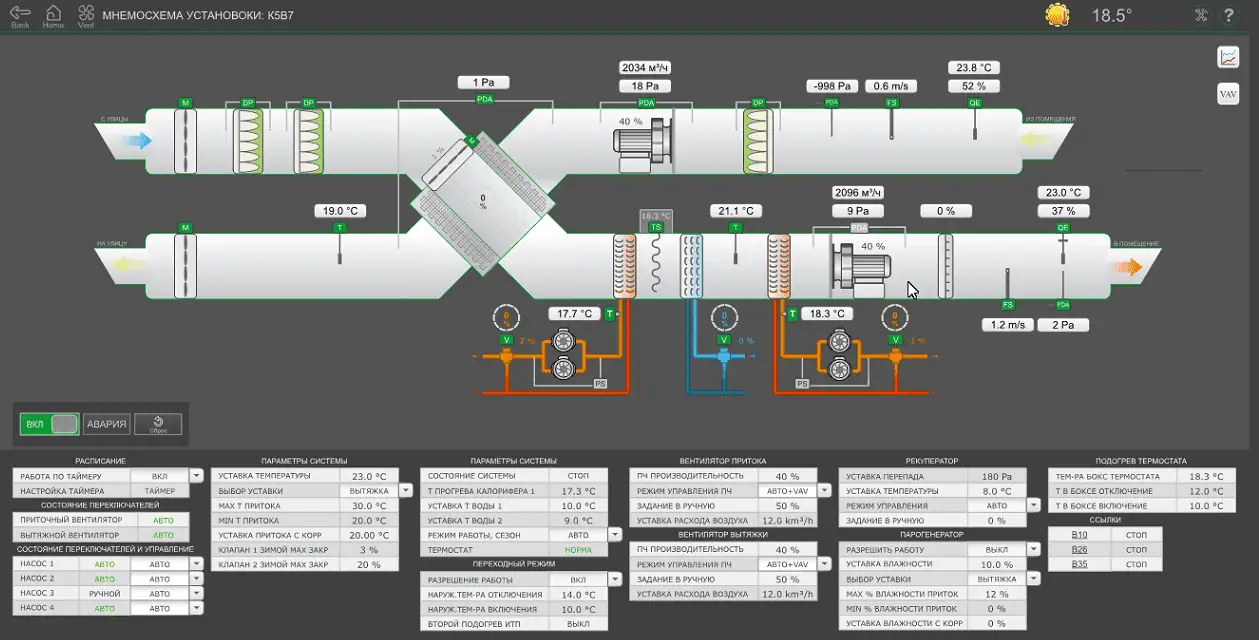
Schneider Electric EcoStruxure Building Operation WorkStation software offers a comprehensive interface designed to monitor and manage all aspects of building management systems (BMS). This software allows users, such as technicians and engineers, to effectively control lighting, HVAC, energy management and other building systems. Published on September 19, 2023 WorkStation Hotfix v4.0.5.7 update is a patch package that improves system stability, fixes bugs and ensures compatibility when migrating to new versions. This article aims to be the most comprehensive resource for content searches in Turkish, describing the features of EcoStruxure WorkStation software and details of Hotfix v4.0.5.7. Optimize your building performance with Schneider Electric's innovative solutions! For more information SpaceLogic AS-P Server visit the page.
What is EcoStruxure Building Operation WorkStation?
EcoStruxure Building Operation WorkStation is a core component of Schneider Electric's EcoStruxure BMS platform. It provides an intuitive and customizable interface for managing building automation systems. Through this software, users can monitor alarms, view graphical visualizations, create timelines, analyze trend records and generate detailed reports. The software is designed to optimize energy efficiency and building performance and has the following key features:
- Customizable Workspace: Users can organize the alarms, graphs and edit panels according to their needs. For example, a technician can reconfigure panels to focus on the HVAC system.
- Encrypted Communication: Supports TLS protocols for secure data transfer, protecting against cyber threats.
- Digital Twin with Brick Schema: By creating a digital representation of buildings, it provides easy access and meaningful context to system points and alarms.
- Device Discovery and Batch Configuration: Automatically detects new devices and makes quick configuration changes for multiple devices.
- User Management: Provides secure account management with password policies; interface can be customized according to language and unit of measure preferences.
- Meter Management and Data Sharing: It monitors energy consumption and facilitates data exchange between different systems.
These features make building management more efficient and user-friendly in different sectors such as hospitals, data centers, retail and industrial facilities. For example, in a hospital, WorkStation can create scenarios that increase patient comfort while optimizing energy consumption.
WorkStation Hotfix v4.0.5.7: Why is it Important?
Hotfix v4.0.5.7is a patch update for EcoStruxure Building Operation WorkStation software released on September 19, 2023. This update is required to enable existing systems to transition smoothly to newer versions and to fix bugs identified in previous releases. It improves system stability and operational efficiency by addressing issues faced by technical staff and engineers in building automation systems. The main objectives of the update are:
- Ensuring Compliance: Ensures systems are ready before migration to new EcoStruxure releases.
- Error Corrections: Fixes software bugs in previous versions, for example, minor glitches in alarm notifications or trend logs.
- Performance Improvements: Optimizes software response times and user experience.
- Security Reinforcements: Protects data security by working in harmony with encrypted communications.
The hotfix is a critical update, especially for technicians and engineers using EcoStruxure BMS. For example, in a data center, this patch makes energy monitoring processes more reliable by preventing system outages.
Hotfix v4.0.5.7 Installation: Windows 10 Guide
Video tutorials and installation guides provided by Schneider Electric can be used to install Hotfix v4.0.5.7 on Windows 10. The installation process includes preparation, installation, activation, login and troubleshooting. Here are the basic steps:
- Preparation: Back up the system and make sure your current WorkStation version is compatible with the Hotfix (e.g. v4.0.x). Log in with an administrator account with the required permissions.
- Download and Install: Download the hotfix file from the official site of Schneider Electric. Follow the instructions by running the installation wizard; it usually takes 5-10 minutes.
- Activation Restart the software after the update and verify the license key. Check the connection of devices connected to the EcoStruxure platform.
- Login Verify that the new features are active by logging in with your user account.
- Troubleshooting: If you get errors during installation, check the error codes on Schneider Electric's support portal or follow the video guides. For example, reconfigure Ethernet settings for connectivity issues.
Video tutorials visualize these steps, enabling users to make quick and error-free installations. For example, if a technician has trouble configuring an alarm panel, they can find a step-by-step solution through the video tutorial.
Advantages of EcoStruxure WorkStation
EcoStruxure Building Operation WorkStation offers flexibility and efficiency in building management. With its user-friendly interface, the software simplifies complex systems and provides the following benefits:
- Energy Efficiency: Reduces costs with real-time energy consumption monitoring and reporting.
- User Centered Design: Customizable panels and language support adapt to different user needs.
- Security: It provides secure and structured data management with encrypted communication and Brick Schema.
- Scalability: It can be used in projects of different scales, from small offices to large data centers.
Örneğin, bir perakende mağazasında WorkStation, aydınlatma ve iklimlendirme sistemlerini otomatikleştirerek enerji tüketimini %20’ye kadar azaltabilir.
Conclusion
EcoStruxure Building Operation WorkStation and Hotfix v4.0.5.7 are powerful tools that reinforce Schneider Electric's leadership in building automation. WorkStation enables users to manage building systems efficiently, securely and intuitively. Hotfix v4.0.5.7 improves system stability and simplifies migration to new versions. Installation guides and video tutorials for Windows 10 ensure technicians and engineers have a smooth implementation of this update. Experience digital transformation in building management with EcoStruxure - energy savings and operational excellence in one! For more information, visit Schneider Electric's official website (se.com) or SpaceLogic AS-P Server visit the page.